
It’s finally here: billable rates per activity! Now you can assign a specific rate per activity and make your time tracking software experience even faster. This will override your default rate so the rate per activity will automatically be applied.
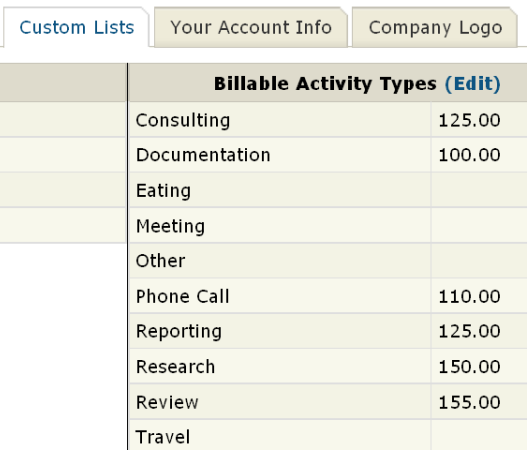
To get started with your billable rates per activity, just do the following:
- Click on “Settings.”
- Click the “Custom Lists” tab.
- Click on “(edit)” next to “Billable Activity Types.”
- Put a check next to “Rate.”
- Put in the desired rate for the appropriate activity type.
- Click on the “Save” button.
- Close the window.
- Refresh the main screen.
Outstanding! This is a big timesaver, a very useful feature, and makes a great product even better. Thanks for keeping up the fantastic work, folks.
If you are a lawyer in solo practice like me, this new feature is great when you are doing paralegal-level work. Great new addition folks. Keep it up
What if you have two lawyers and they each charge different rates for the same activity? Is there a way to achieve that?
What you can do is have two activity types: Activity X – you, Activity X – other user. There’s another way is to have the over-ride rate per time entry. Check out “To Change a Time Entry Rate” in this link: https://bill4time.zendesk.com/entries/165615-how-do-i-change-billing-rates